
Quick answer: Generative AI is a kind of artificial intelligence that creates new content, such as text, images, audio, video or code, instead of only sorting or labelling information that already exists. It learns patterns from large amounts of example data and then produces new output that follows those patterns. It can be very useful, but it can also be confidently wrong, so anything that matters needs a human check.
This guide explains the idea in plain language, shows where it helps in everyday work, and spells out the risks you should know before relying on it. It is part of our AI section. It is a research-based explainer: it draws on the published sources listed at the end, not on hands-on testing of specific products. Where a claim comes from a source, the source is linked next to it.
In this guide
- What generative AI means
- How generative AI works
- What generative AI can create
- Practical ways beginners can use it
- Limits and risks
- Using it responsibly: rules and a routine
- Glossary
- Conclusion
What generative AI means
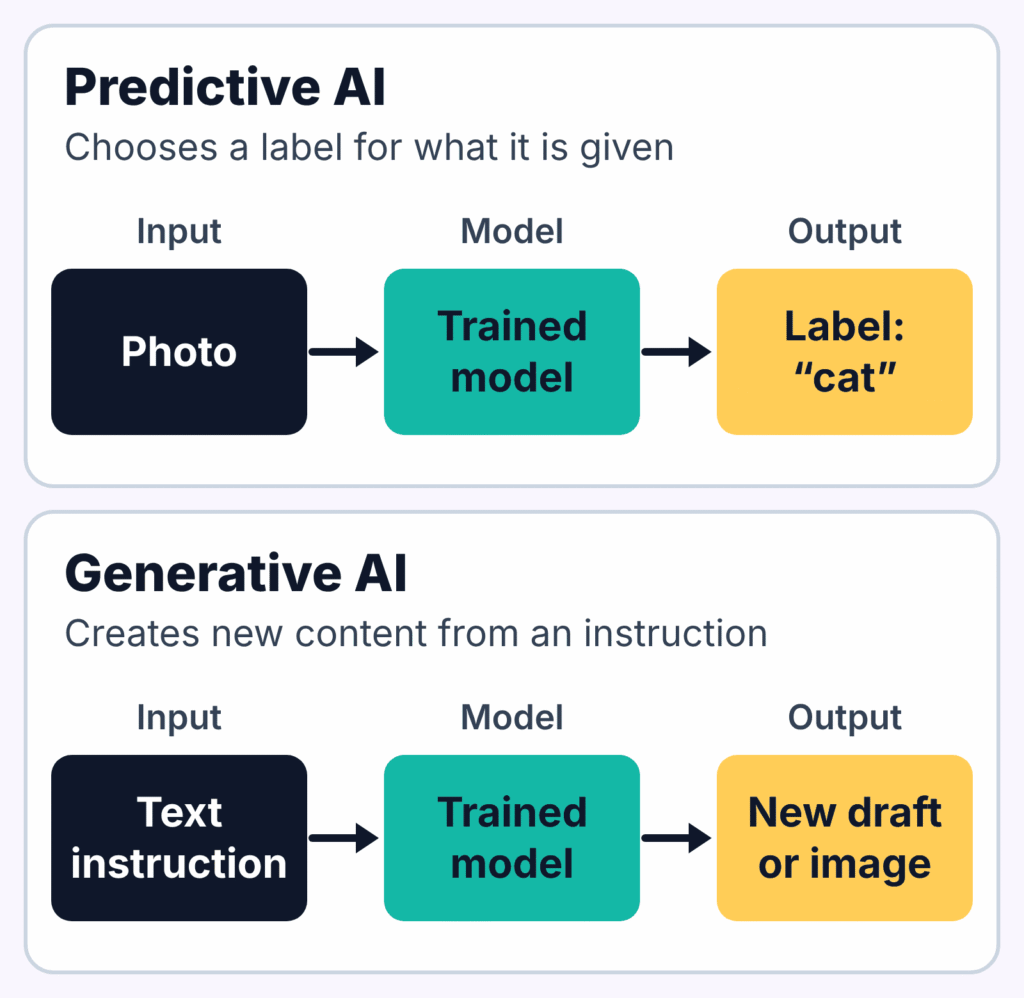
Most software follows rules a programmer wrote down. Traditional machine learning goes one step further: it learns from examples, but usually to make a decision, for instance whether an email is spam or which product to recommend. Generative AI also learns from examples, but its job is different. It produces something new.
The U.S. National Institute of Standards and Technology (NIST) uses a definition taken from U.S. Executive Order 14110. In its Generative AI Profile (NIST AI 600-1), a footnote quotes the order and describes generative AI as “the class of AI models that emulate the structure and characteristics of input data” so that they can produce new, derived content such as images, video, audio and text. In plain terms: the model learns what a large collection of examples looks like, then makes new material that resembles it.
Generative AI versus the AI you already use
- Predictive or classifying AI answers a narrow question: is this transaction suspicious, is this photo a cat, what is this customer likely to buy.
- Generative AI produces an open-ended output: an email draft, a summary, an illustration, a block of code, a spoken voice.
The two are related and often combined. The difference explains why generative tools feel so flexible: you describe what you want in ordinary language, and the system responds with something you did not have a moment ago.
A short timeline of key research
Generative AI looks sudden, but it rests on research that built up over years. Four published papers help explain how we got here:
| Year | Paper | Why it matters |
|---|---|---|
| 2014 | Goodfellow et al., “Generative Adversarial Networks” | Introduced GANs, where two networks are trained against each other to produce realistic samples. |
| 2017 | Vaswani et al., “Attention Is All You Need” | Introduced the Transformer architecture, which many modern language models build on. |
| 2020 | Ho, Jain and Abbeel, “Denoising Diffusion Probabilistic Models” | Showed high-quality image generation with diffusion models. |
| 2022 | Ouyang et al., “Training language models to follow instructions with human feedback” | Described fine-tuning language models using human feedback so they follow instructions better. |
This is a selection, not a complete history. Dates are the papers’ first arXiv submission dates.
How generative AI works
Different systems work in different ways, so what follows is a simplified picture, not a technical specification.
It learns patterns from examples
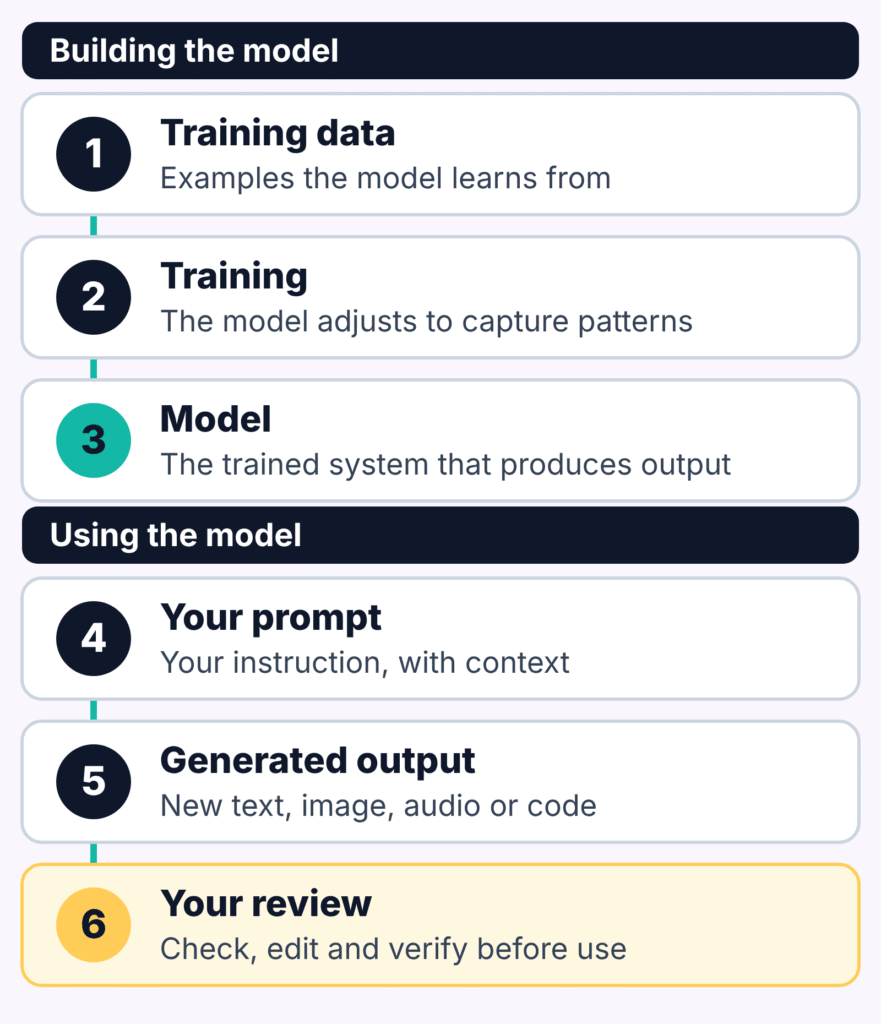
During training, a model is shown a very large number of examples, for instance passages of text. It adjusts its internal settings so that it captures the patterns in those examples: which words tend to follow which, how sentences are built, how ideas are usually explained. When a model produces output, it is generally generating it from patterns encoded in its learned parameters, rather than retrieving a complete copy of each training document. That does not mean it can never reproduce training material: models can sometimes reproduce parts of what they were trained on. NIST’s profile (covered below) lists leakage of personal data and easier replication of copyrighted content among the risks it identifies; it describes these as risks to manage, and does not tell you how often they occur in any particular tool.
Large language models predict what comes next
The text tools most people meet first are built on large language models (LLMs). At a basic level, an LLM reads the text so far and estimates what is likely to come next, one small piece at a time. Repeat that many times and you get full sentences and paragraphs. Many modern language models build on the Transformer, introduced in Vaswani et al. (2017). Its central idea, attention, lets a model weigh how relevant different parts of its input are to one another.
Images and other media: two important approaches
Image and media generators use several techniques, and the field changes quickly. Two influential ones are worth knowing by name. Diffusion models, as in Ho, Jain and Abbeel (2020), learn to turn random noise into a clear picture step by step. GANs, from Goodfellow et al. (2014), train one network to create samples and another to judge them, so each pushes the other to improve. They are not the only methods, and a given product may use a different or combined design. You do not need the maths to use these tools; what matters is that they, too, work from learned patterns rather than from human understanding.
Tuning with human feedback
A model trained only to continue text does not automatically follow instructions well. One well-known remedy is fine-tuning with human feedback, described in Ouyang et al. (2022): people compare or rank outputs, and the model is adjusted toward the responses they prefer. Products differ in how they are trained and tuned, and many companies do not publish the details, so do not assume every chat tool works this way. Feedback-based tuning can make a model more useful; it does not guarantee accuracy.
What generative AI can create
| Type | You give it | You might get | Check before using |
|---|---|---|---|
| Text | A question, notes or an instruction | Drafts, summaries, outlines, rewrites, explanations | Facts, names, figures, quotes |
| Images | A written description | Illustrations, concept images | Licence terms, accuracy, whether it resembles real people or existing work |
| Audio and video | A script or description | Synthetic voices, music, short clips | Consent, labelling, platform rules |
| Code | A task or error message | Snippets, explanations, debugging help | Run and test it; review security |
Which of these a tool supports depends on the product, and capabilities change quickly, so check the tool’s own documentation before assuming it can do something.
Practical ways beginners can use it
The safest starting point is work where you can judge the result yourself.
Understand something faster
Ask a tool to explain a topic at a level you choose, then ask follow-ups. Example prompt: “Explain what a domain name is, as if I have never built a website. Use one everyday comparison.” Treat the answer as a starting point and confirm important details with an official or primary source.
Get past a blank page
Ask for an outline or a list of angles, then write the real version in your own words. Example prompt: “Suggest five possible outlines for a 600-word article on saving time with spreadsheets, for office beginners.” The value is speed at the start, not a finished product.
Tidy and summarise your own material
Paste in your own notes, or a document you are allowed to share, and ask for a summary or clearer structure. Example prompt: “Summarise these meeting notes in five bullet points and list any decisions that were made.” Because you know the source, mistakes are easy to spot.
Learn to code or work with spreadsheets
Ask for a small example, an explanation of a formula, or a plain-language reading of an error message. Example prompt: “Explain what this spreadsheet formula does, step by step.” Run and test anything it gives you before real use.
A good prompt names the task, the audience, the format and any constraints. Compare a vague request, “Write about budgeting”, with a specific one: “Explain monthly budgeting to a first-year university student in five short bullet points, using plain language and one practical example.”
Limits and risks
NIST’s Generative AI Profile sets out 12 risk categories. Four matter most for everyday beginners.
It can state false things confidently
NIST calls this confabulation (section 2.2): a system confidently presenting erroneous or false content. It is also commonly called hallucination. It follows from how these models work. They generate output that approximates patterns in their training data, which can produce accurate answers but also inaccurate or made-up ones, including invented reasoning and citations. A fluent, authoritative tone is not evidence of correctness.
It can reflect bias
The profile lists harmful bias and homogenization (section 2.6): models can amplify historical and societal biases, perform unevenly across groups or languages, and push output toward sameness. If a result affects people, such as a job description or a summary of a person, review it for fairness before using it.
Your private information may be at risk
The profile lists data privacy (section 2.4) as a risk, covering leakage and unauthorised use or disclosure of personal or sensitive data. Before pasting personal, client or confidential material into any AI tool, read that tool’s privacy and data-use settings. Services handle inputs differently, and the safest habit is not to share anything you would not be comfortable disclosing.
Copyright and fake media
The profile lists intellectual property (section 2.10), including easier replication of content that may be copyrighted or trademarked, and information integrity (section 2.8), including realistic synthetic media often called deepfakes. Do not present AI-made images or audio as real, do not imitate real people without consent, and check licence terms before commercial use.
What to verify every time
- Check names, dates, figures and quotes against the original source.
- Open any source the tool cites and confirm it exists and says what the tool claims.
- Be especially careful with health, legal, financial and safety topics, where a wrong answer can cause real harm. Use qualified professionals for those.
Using it responsibly: rules and a routine
What the rules say (as of October 2026)
Rules are changing quickly, so treat this as a brief snapshot of official pages, not a full account, and check the sources yourself.
- European Union. The Commission’s Article 50 FAQ (last updated 24 July 2026) says the AI Act’s transparency rules apply from 2 August 2026. Two sets of duties matter most here. Providers of AI systems that generate synthetic audio, image, video or text must ensure outputs are marked in a machine-readable form so that they can be detected as AI-generated or manipulated. Deployers, meaning those who use an AI system under their authority, must clearly disclose deepfakes, and must clearly label AI-generated or manipulated text published to inform the public on matters of public interest. The FAQ’s definition of a deployer excludes personal, non-professional use, but regular economic benefit, or use in a business, trade, occupation or freelance activity, can make someone a deployer. The human review or editorial control exception applies only to the public-interest text duty, and it requires substantive review or editorial control, with someone holding responsibility for publication; spell-checking does not count. Providers of systems already on the market before 2 August 2026 have until 2 December 2026 for the marking duty. The Commission’s enforcement page (last update 6 October 2026) says national competent authorities enforce the rules for AI systems outside the AI Office’s remit, and the regulatory framework page (last update 3 August 2026) lists other dates under the Act.
- Google Search. Google’s guidance on generative AI content says AI can help with researching and structuring original content, but using it to mass-produce pages that add no value may violate its spam policy on scaled content abuse. It also advises manually reviewing and fact-checking AI-generated content, including titles, descriptions and alt text, before publishing.
These are brief summaries of official pages, not legal advice, and they leave out detail. If you publish or sell something, check the sources to see which rules apply to you.
Your responsibility and a simple routine
If you publish or send something an AI tool helped write, you are accountable for it. That is also how we work: see our editorial policy for how we handle sourcing and accuracy. A simple routine helps:
- Define the task. Say what you want, for whom, and in what format.
- Give context. Include the relevant facts you already know.
- Review critically. Treat the first answer as a draft.
- Verify the claims. Check anything factual against a reliable source.
- Protect privacy. Leave out anything confidential.
- Make it yours. Edit for accuracy, tone and purpose before you use it.
Glossary
- Generative AI: AI that creates new content such as text, images, audio, video or code.
- Model: the trained system that produces the output.
- LLM (large language model): a model trained on large amounts of text to predict and generate language.
- Transformer: a model architecture built around attention; the basis of many modern language models.
- Prompt: the instruction or question you give the tool.
- Training data: the examples a model learns from.
- Fine-tuning: further training to adapt a model, for example to follow instructions better.
- Confabulation (hallucination): confident output that is false or made up.
Conclusion
Generative AI creates new content by applying patterns learned from examples. That makes it a flexible assistant for explaining, drafting, summarising and brainstorming, and it explains its main weakness too: it can produce something that sounds right and is wrong.
The practical takeaways are simple. Start with tasks you can judge yourself. Write specific prompts. Verify facts and sources before you rely on them. Keep private information out of tools you do not trust. Treat every output as a draft you are responsible for.
Sources
- NIST, Artificial Intelligence Risk Management Framework: Generative Artificial Intelligence Profile (NIST AI 600-1), July 2024.
- Goodfellow et al., “Generative Adversarial Networks”, arXiv:1406.2661, submitted 10 June 2014.
- Vaswani et al., “Attention Is All You Need”, arXiv:1706.03762, submitted 12 June 2017.
- Ho, Jain and Abbeel, “Denoising Diffusion Probabilistic Models”, arXiv:2006.11239, submitted 19 June 2020.
- Ouyang et al., “Training language models to follow instructions with human feedback”, arXiv:2203.02155, submitted 4 March 2022.
- European Commission, AI Act regulatory framework page, last update shown 3 August 2026 (checked 9 October 2026).
- European Commission, Transparency obligations under Article 50 of the AI Act (FAQ), last updated 24 July 2026 (checked 9 October 2026).
- European Commission, Enforcement of the AI Act, last update shown 6 October 2026 (checked 9 October 2026).
- Google Search Central, Using generative AI content, last updated 1 October 2026.